How Do I Publish a Book for Free on Amazon Kindle Direct Publishing (KDP)? The Complete Step-by-Step Process
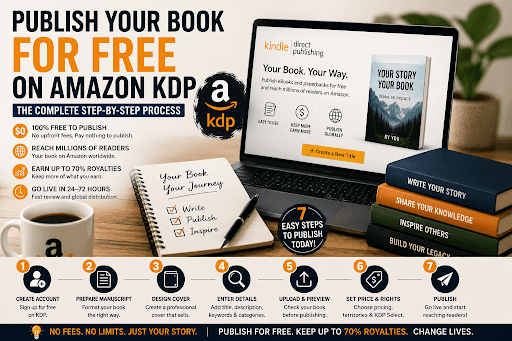
What Is Amazon KDP and Why Is It Free?
- No printing costs upfront — paperbacks and hardcovers are printed only when a customer orders one.
- No listing fees — uploading and publishing your book costs nothing.
- No inventory risk — you never buy stock or manage shipping.
KDP Royalty Structure at a Glance
| Format | Royalty Rate | Conditions |
|---|---|---|
| eBook | 70% | Price between $2.99–$9.99, enrolled in standard terms |
| eBook | 35% | Price below $2.99 or above $9.99 |
| Paperback | 60% | Minus printing costs (deducted per copy sold) |
| Hardcover | 60% | Minus printing costs (deducted per copy sold) |
Step-by-Step Process to Publish Your Book on KDP for Free
Step 1: Create Your Free KDP Account
- Author/Publisher information — your legal name and address.
- Payment details — the bank account where Amazon will deposit your royalties.
- Tax information — a short digital tax interview (non-US authors can usually claim treaty benefits to reduce withholding).
Step 2: Prepare and Format Your Manuscript
- eBooks: DOCX, EPUB, or KPF (created with Amazon's free Kindle Create tool)
- Paperbacks/Hardcovers: Print-ready PDF with correct trim size, margins, and bleed
- Professional editing and proofreading are complete — typos destroy reviews.
- Front matter (title page, copyright page) and back matter (author bio, call-to-action) are in place.
- Chapter headings use consistent styles so the table of contents generates correctly.
- Images are high resolution (300 DPI for print).
Step 3: Design a Cover That Sells
- KDP Cover Creator — Amazon's built-in tool with templates and stock images.
- DIY design — using free software like Canva, exported to KDP's exact specifications.
Step 4: Enter Your Book Details (Metadata)
- Title and subtitle — include natural, searchable phrases in your subtitle.
- Book description — a compelling, benefit-driven blurb (you can use basic HTML formatting).
- 7 keywords — phrases readers actually type into Amazon's search bar.
- Up to 3 categories — choose specific niche categories where you can realistically rank as a bestseller.
- ISBN — Amazon assigns a free ISBN for print books, or you can use your own. eBooks don't require one.
Step 5: Upload Your Files and Preview
- Broken chapter breaks or orphaned headings
- Images that shifted during conversion
- Margins cutting into text in print editions
Step 6: Set Your Pricing and Distribution
- Inclusion in Kindle Unlimited (you earn per page read)
- Free promotion days and Countdown Deals
Step 7: Hit Publish
After Publishing: What Actually Drives Sales
- Set up your Amazon Author Central page with a professional bio and photo.
- Gather early reviews from your network and advance readers (never pay for fake reviews).
- Build an author platform — an email list, social presence, or website.
- Run Amazon Ads once you have reviews, starting with a small daily budget.
Common Mistakes to Avoid
- Skipping professional editing — the #1 cause of bad reviews.
- Choosing broad, competitive categories instead of winnable niches.
- Writing a flat book description that lists contents instead of selling benefits.
- Ignoring the print previewer and shipping formatting errors to paying customers.
- Publishing and disappearing — books need at least a modest launch push.
Final Thoughts
FAQs
1. Is Amazon KDP really 100% free?
Yes. There are no fees to create an account, upload, or publish. Amazon earns by taking a share of each sale; you receive up to 70% royalties on eBooks and 60% on print (minus printing costs, deducted only when a copy sells).
2. Do I need an ISBN to publish on KDP?
Not for eBooks — Amazon assigns an internal identifier (ASIN). For paperbacks and hardcovers, KDP provides a free ISBN, or you can supply your own if you want your imprint listed as the publisher.
3. How long does it take for my book to go live?
Most books pass Amazon's review within 24–72 hours. eBooks typically appear faster than print editions, which may take slightly longer for the listing to fully link.
4. How much money can I make self-publishing on KDP?
Earnings vary widely. A $4.99 eBook at 70% royalty pays about $3.49 per sale. Income depends on your niche, cover quality, reviews, keywords, and marketing consistency — not luck.
5. Should I publish on KDP myself or hire professionals?
If you're comfortable with formatting, design, and marketing, DIY is entirely doable using this guide. If you'd rather guarantee a polished, market-ready result, working with an experienced publishing partner such as Berg Publishers can save time and prevent costly beginner mistakes.
Author Bio:
Isabella Watson is a professional content specialist focused on book publishing and author services. She writes and reviews technical and informative content to help aspiring and seasoned authors navigate the professional publishing process. Her work focuses on quality, trust, and hassle-free creative writing.
GET FREE CONSULTATION
Recent Posts
Why Thousands of Authors Trust Berg Publisher for Professional Publishing Services?
Our Publishing Services Explained | Expert Book Publishing Services
Client Satisfaction Comes First at Berg Publisher Book Publishing Agency
Is hiring a ghostwriter from a ghostwriting agency worth it?
Why professional authors choose ghostwriting services?
Can I Hire a Ghostwriter Online to Write My Life Story?
What are eBook writing services, and how do they help businesses generate leads?
What Berg Publisher Does as a Leading Professional Book Publishing Agency?
A Guide to Understand Rights and Credits Retention in Ghostwriting Services.
Why Book Editing is More Important Than You Think?
How to Choose the Right eBook Writing Service for Your Book or Business?
Common Mistakes Authors Make Without an eBook Writing Service
How Much Do eBook Writing Services Cost?
Professional eBook Writing, Ghostwriting and Editing Services for Authors
Best Book Publishing Agencies for Aspiring Authors 2026
Manuscript getting rejected again and again?: 2026 best book editing service
Explore the top book marketing services: Self-book publishing authors 2026
10 major benefits of hiring fiction ghostwriting services for your novel
How to design a professional book cover that sells in 2026
How to Hire a Fiction Ghostwriter for Your Novel
How to Choose a Book Publishing Agency for International Distribution?
How Book Publishing Agencies Choose Which Manuscripts to Publish?
The Day-to-Day Workflow of a Professional Book Publishing Agency?
How Editors at a Book Publishing Agency Shape Your Manuscript into a Bestseller?
AI vs human ghostwriters: Which is best for writing books in 2026?| ghostwriting services
What Most Authors Don't Know About Book Publishing Agency Submission Processes?
AI Ghostwriting in 2026: How Human Ghostwriters Still Add Value
Ghostwriting Services | Best AI Tools for Writing Books in 2026
Behind the Scenes: How Agencies Decide Marketing Budgets for Books?
How a Book Publishing Agency Evaluates Manuscript Potential (2026 Guide)
Do AI tools beat human writers?| Book publishing services explained
Book Publishing Service Explain, Will AI Replace Authors?
10 Reasons to Hire a Professional eBook Writer in 2026
30+ Questions to Ask an Author About Their Book (With Answer Guides)
How to Write a Book Without Typing
How Book Publishing Services Help Veterans Share Their War Stories?
How Agencies Handle Multiple Authors Efficiently?
How Book Publishing Agency Experts Predict Reader Trends?
Why Book Editing Services and Editors Matter in the AI-Driven Publishing Era?
Pricing Secrets: How a Book Publishing Agency Decides Author Royalties?
How does a Book Marketing Agency Handle Sci-Fi, Fantasy, and Romance Books Differently?
How to Negotiate the Best Deal with a Book Publishing Agency (2026 Guide)
I Published My First Book at 60: Guide to Book Publishing Services for First-Time Authors
The Real Cost of Publishing a Book via Book Publishing Services in 2026?
30+ Questions Every Author Should Ask Before Using Book Publishing Services
Hire an EBook Writer to Build Brand Authority
Why Book Launches Get Delayed (and How to Avoid It)
Is Your Book Ready to Be Published? Check Now
Manuscript to Published Book: A Step-by-Step Guide
Famous CEO Books That Were Written by Ghostwriters
Common Publishing Mistakes Every Author Should Avoid
Legal Requirements for Publishing a Book in the USA
What Successful Self-Published Authors Do Differently
Will Your Book Ever Pay You Back? Here's the Truth
Choosing the Right Genre and Category for Your Book
Hidden Contract Clauses Authors Miss in Book Deals
Best Fiction Writing Services | Berg Publishers
Who Owns a Ghostwritten Book? | Berg Publishers
Book Publishing Services That Don't Hide the Price
Ghostwriter vs. Co-Author: Which One Is Right? | Berg
How CEOs Become Published Authors | Berg Publishers
Amazon Publishing vs. Berg Publishers: Which Wins?
How to Vet a Ghostwriter: A 10-Point Checklist
Vanity Press Warning: 12 Red Flags Before You Sign
eBook Writing Service: How to Choose the Right One
Why Ebooks Fail: 8 Honest Reasons You Can't Ignore
5 Reasons to Hire an Editor Before Self-Publishing a Book
How to Tell If Your Book Is Competing Against an AI Knockoff on Amazon
How to Promote an Ebook After Publishing: Beyond Amazon and Your Website
How to Sell Short Stories on Amazon Kindle: Tips and Tricks for New Authors
8 Podcast Recommendations for Writers and Self-Publishers (2026 Edition)
An Interview with USA Today Bestselling Author Kelly
How Do I Publish a Book for Free on Amazon Kindle Direct Publishing (KDP)? The Complete Step-by-Step Process
AI and Book Publishing in 2026: 4 Changes Every Author Should Know
Which Fonts and Font Sizes Are Best for Your Book's Interior Formatting?
Business Ebook vs Amazon Ebook: Two Completely Different Goals
Cost vs Value: Is a Professional Agency Worth It for Your Book?
15 Creative Book Marketing Ideas for Self-Published Authors (2026 Guide)
2026 Publishing Trends: What Authors, Editors & Publishers Must Know
Internal vs External Conflict: How They Are Used in a Story
Book Royalty Calculator: KDP vs IngramSpark vs Draft2Digital (Exact Math)
Best Publishing Platforms 2026 to 2027: The Ultimate Comparison Guide
AI Book Cover Design: Legal Risks Every US Author Must Know in 2026
How to Hire and Work with a New York Ghostwriting Company
How Much Do Ghostwriters Cost in New York? A Complete NYC Pricing Guide for 2026
The Ultimate Guide on How to Write a Book in 2026
Tips for Authors Writing in Less Popular or Emerging Genres
Top 10 Best Selling Authors of All Time | Book Publishing

We create books that connect with audiences. From the initial outline to publication and marketing, we support our clients throughout the entire process.
SERVICES
- Fiction Ghostwriting
- Non-Fiction Ghostwriting
- Book Editing
- Book Printing
- Book Marketing
- Audiobook Publishing
- Hybrid Publishing
- IngramSpark Publishing
- ISBN and Copyright Registration
- Book Cover Design
- eBook Writing
- Self-Publishing for Tech Founders
- Amazon Publishing
- Self-Publishing vs Traditional Publishing
- Book Publishing Timeline & Process
- Book Publishing Cost USA
- Author Success Stories & Case Studies
- Biography Writing
- Novel Writing